Wednesday, 11 March 2015

Samsung Galaxy S6 Edge Full Specifications Features & Price in India

Samsung unveiled their latest flagship phones the Galaxy S6 and the Galaxy S6 Edge yesterday at Mobile World Congress in Barcelona, Spain.And this time round, they are focusing on not just the specs but also the design. The Galaxy S6 and Galaxy S6 Edge have a metal frame and a glass body both on the front and back.The Samsung Galaxy S6 is 6.8 mm thin and weighs 138g, while the Samsung Galaxy Edge is 7.0mm and weighs 132g.

The Galaxy S6 and S6 Edge will be available globally and on every major U.S. carrier starting April 10, 2015 with 32/64/128GB storage options available in White Pearl, Black Sapphire, Gold Platinum, Blue Topaz.We got best hands on both, and here’s what we think about the phones so far.The Galaxy S6, which was launched alongside the Galaxy S6 Edge, features a redesigned metal and glass casing, a 5.1in QHD screen and a stripped-back version of Samsung's TouchWiz UI, which the firm is no doubt hoping will help it woo buyers away from the likes of the best iPhone 6 and HTC One M9.          

Samsung  Galaxy S6 Design Well as we have seen the design of Samsung Galaxy S5, it’s not that hard to determine the design of the Samsung Galaxy S6 .  Many of the futuristic reviews expected that Samsung galaxy S5 would have a aluminum body and a finish just like the HTC One ,but it was hardly that way. It was launched with a perforated  back panel . Additionally it was waterproof and dustproof and interestingly it had fingerprint scanner ,which many people thought it might not have as the recently launched Iphone 5S had it . But keeping few things apart Samsung main focus on the smartphone was the Fitness of a person,so it had also installed a H R sensor i.e the Heart Rate Sensor making sure that person can measure his/her heartbeat.  Well with all this in just the Samsung Galaxy S5 ,it leaves us thinking what else could be there in the all new Samsung Galaxy S6 Smartphone in 2015.

Best Price in India: Rs 58,000/-

Samsung Galaxy S6 full Specification and Features

1.  16 MP Primary Camera

2. 5 MP Secondary Camera

3.  3GB RAM

4. 32/64/128 GB Variants with addition memory slot

5. Dustproof and Water resistant

6.Metallic Body expected

7. Exynos 7 processor.

8. Fingerprint scanner

9. No Retina Scanner (expected)

10.HR sensor( Heart  rate sensor)

11. Android 5.0

12.Ultra Power Saving Mode+ KIDS Mode

13. Non removable Battery of at 2600mAh

14 . Wireless charging

15. Best in class Memory Storage (tecnology os SSD is used )

16. The Samsung Galaxy S6 Edge provides you to reject calls from the back panel as well.

17. 5.1 inch Quad HD Super AMOLED screen .

18. Samsung Pay , is one of the amazing features that has been introduced.

Tuesday, 3 March 2015

List of five Alternative Text Messaging Apps for Android

One of the best looking SMS apps available for Android is Evolve SMS. This app fully embraces all of the Android design guidelines, and looks great doing it. The interface allows you to slide easily between conversations, and a pop-up makes it easy to quickly respond. There is group messaging, gestures, widgets, themes, tons of emojis, customizeable notifications, and much more. Here are 5 alternative SMS apps to install and bring texting back to basics on Android.

Handcent SMS

Handcent calls itself the “most popular messaging app on the Android platform.” It has certainly been around for a long time, and apparently people are still using the crap out of it. What Handcent lacks in design it makes up for with features. It has a handy pop-up quick reply windows, Facebook profile photo sync, tons of themes and skins, group chat, cloud backup, and so much more.

Chomp SMS

chomp SMS is an SMS app which has been around for a long time, and progressed alongside of Android to become one of the most popular Android SMS apps of today. Some of its features include a huge array of emojis, passcode app lock, message locks, more intense privacy options, blacklists, quick reply popups, not to mention a ton of customization options, as well as Pushbullet and Android Wear compatibility.

Textra SMS

Textra SMS is a great text message app and is being added to this list partially because the developer was quick to bring the new Andorid L Material Design to the app, which makes this already ‘’beautiful’’ texting app even more appealing.

It’s also got a lot of features, a lot more than the stock SMS app on your device will offer, such as floating notifications, quick reply popups, a heap load of signature and notification types, and it’s also compatible with PushBullet as well as Android Wear in case you’ve bought yourself a Moto 360, LG G Watch R or Samsung Gear Live.

Hangouts

In a landslide victory Google’s own SMS/instant messaging app was your top pick. Hangouts started life as Google Chat/Talk, but recently was converted to a proprietary messaging service. In the past year Google has also added the ability to send SMS with Hangouts, and made it the default messaging app on Nexus devices. It can do video chat, voice calls, group chats, send photos, and just about everything else you’d expect.

Evolve SMS

One of the best looking SMS apps available for Android is Evolve SMS. This app fully embraces all of the Android design guidelines, and looks great doing it. The interface allows you to slide easily between conversations, and a pop-up makes it easy to quickly respond. There is group messaging, gestures, widgets, themes, tons of emojis, customizeable notifications, and much more.

Thursday, 19 February 2015

The Best Antivirus Apps For Your Smartphone

Android's increasing popularity has led to increased security threats, ranging from common malware to advanced Phishing and ID theft techniques. In order to help Android users to deal with these issues, many security software companies have launched their own security apps, but paying nearly 30 bucks a year for a complete mobile security app doesn't sound like a good deal, especially when there's a wide choice of free security apps that will cover all your needs including a group of complete security suites with Anti-Theft capabilities.

CM Security

With nearly 3 million reviews CM Security has an almost flawless 5-star rating in the Google Play Store. In the AV-TEST performed earlier this year, CM Security scored a 100% virus detection rate. The app is blazing fast, lightweight, and most importantly, secure. CM uses local and cloud engines powered by 200 million users. This app has everything that we look for: great ratings, tons of users, proven results, and it’s completely free.

AntiVirus Security (AVG)

AVG is a well known anti-virus product for PCs and it’s also available on Android platform as well. With over 100 million downloads, AVG is one of the most downloaded mobile security apps in Android play store, which protects your phone from harmful viruses, malware, spyware and text messages and helps keep your personal data safe. The UI is very simple and easy to use. For better performance AVG features a task killer along with protection that allow you to kill all the tasks and processes that can slow down or freeze up your phone.

Eset Mobile Security

Eset Mobile Security is one of the award winning and best Antivirus apps for Android mobile or tablet. It keeps your data secure and safe and never make your mobile infected with Virus or dangerous malware. Once you set everything, it takes control over your mobile from background and protects the mobile each and every second. It keeps your mobile secure while browsing internet, using Bluetooth etc.

McAfee Antivirus and Security

McAfee, received about 9 awards for their awesome service and tons of 5 stars review on Google Play, it indirectly says, how popular is this application. Unfortunately McAfee, is premium app and you have to pay $$ for the company inorder to enjoy all features. However you can get free 7 days trail, later you can make the purchase within the application. By installing this app, you’re enabling the Uninstall protection, which  can prevent the thieves and others to uninstall any of the installed application without proper commands from the mobile owner. In the last points of battery, it closes the unused running apps automatically without any further notification.

Tuesday, 17 February 2015

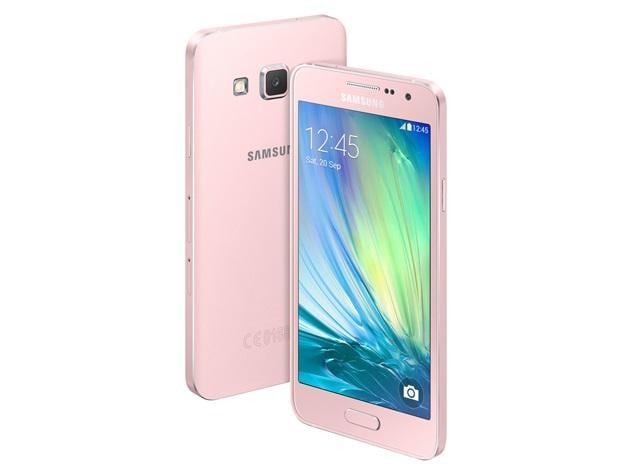
Samsung Galaxy A3 Review 2015: Full Specifications

Samsung has done it again with a low cost, all metal unibody smartphone. This device has got a mix of specs and features that make it an interesting entrant into the smartphone market and whether it is going to be a success or not is yet to be seen. Here, we look at the specs and features that come with this new device as well as some of the reviews about it and benefits as well as drawbacks of the all new Samsung Galaxy A3.

Design

The A series is very different from the company's S series smartphones. If the S series phones have a mostly plastic build, the A series phones have a sleek aluminum body and a very slim look. The Galaxy A3 measures 5.12 x 2.58 x 0.27 inches and weighs 3.89 ounces. The home key is up front, the lock key is on the right, and the volume rocker is on the left of the device.

Features:

Starting from the specifications, the galaxy A3 sports an impressive 4.5inch screen, a quad-core 1.2 GHz snapdragon 400 CPU with 1GB or RAM. This probably means that the phone will start to degrade in performance over time as more apps are added onto it. However, the additional port to slot in a microSD card means that there is still some additional expansion space for the users who will be having a lot of applications running on the device.

With a 1900mAh battery, the battery life of the Samsung Galaxy A3 is somewhat impressive as compared to other 1080 beasts available in the marketplace. The device is said to be running android 4.4 which is bound to eat up a lot of storage space on the device. However, the low spec CPU and RAM in addition to a lower pixel count on the screen means that the phone will perform much better in terms of power maintenance as compared to its counterparts.

The Galaxy A3 has an 8MP rear-facing camera which supports 1080p Full HD video recording at 30 frames per second. Those who love to take selfies will appreciate the smartphone's 5MP front shooter, which sets the phone above other premium devices with only 2MP front-facing cameras.

Monday, 9 February 2015

HTC Desire A55 Specifications Leaked With 3GB RAM

HTC looks to introduce the Desire A55 shortly in 2015, which is touted to be one high-end Smartphone with exceptional specifications. This new desire series is the flagship HTC smart-phone. According to leaked specs, the A55 packs a 5.5-inch QHD display and powered by a MediaTek MT6795 octa-core 64-bit chipset. A 20 megapixel camera placed at rear and a 4 ultrapixel or 13 megapixel at front. The upcoming device offers a 3GB RAM, 32GB internal storage and a 3000 mAh battery. The A55 runs on Android 5.0 Lollipop with HTC Sense 7.0.

Design and Display

The HTC is said to be dropping the HTC One M9 in favor of HTC Desire A55. The design of HTC Desire A55 isn’t out yet but if the HTC is going to stick to design which are already available in the Desire series then they are going to make whole lot of changes and make significant improvements in the design.

But if they are going to stick with the design of HTC One M8, then it might be a good thing. The HTC One M8 has a class leading Design. The display is said to be a 5.5 inch Quad HD Display with the resolution of the  2560 x 1440. It is one of the most expected upgrade that everybody is expecting from the HTC latest flagship smartphone.

Hardware Specs

Powering the Desire A55 is the 64-bit MediaTek MT6795 chipset with an Octa-core processor paired along. Clock speed for the cores in action is 2GHz with 3GB of RAM allotted to the Desire A55, assisting the same with multitasking. Built-in storage limit is 32GB for this handset.

Camera

In terms of camera hardware, the Desire A55 houses a 20MP primary module, sitting pretty at the rear. This rear camera unit showcases LED Flash and Autofocus as the included specs besides video recording capability. HTC packs in a 13MP/4 Ultra-Pixel front shooter as the secondary camera unit, mainly for clicking out selfies and attending video calls.

HTC Desire A55 Specifications:

  • 5.5-inch (2560 x 1440 pixels) Quad HD display
  • 2 GHz Octa-Core MediaTek MT6795 64-bit processor with PowerVR G6200 GPU
  • 3GB RAM, 32GB internal memory
  • Android 5.0 (Lollipop) with Desire Sense 7.0 UI
  • 20MP rear camera with LED Flash
  • 13MP or Ultrapixel front-facing camera
  • Dual SIM (Optional)
  • 3.5 mm headset jack, Dual front-facing BoomSound stereo speakers
  • 4G LTE, WiFi 802.11 a/ac/b/g/n (2.4 and 5GHz), Bluetooth 4.1 and GPS with GLONASS

Wednesday, 4 February 2015

Best Battery Saver App for Android Phone 2015

If you are someone who is always worries in regards to the excessively draining battery life of the mobile phone or your tablet then you certainly need to download special applications that check your battery application and recommend to you the ways that they you can save or increase your battery life. These kinds of apps are known as battery saver apps. Android app store has many of such battery saving apps which detect each of the open applications of your device and alert you to close them to avoid wasting the battery life and increase it.

These Android battery saving apps will make your Android phone battery last longer. All the battery saving apps that are shown here is free. Below are the best 5 Android Battery Saving Apps:


DU Battery Saver

DU battery Saver is the most downloaded battery saver app in Play Store. And has been installed more than 100 million times up till now. This app can boost your android phone’s battery life to up to 50%. This app is free to download but it also has a paid version with more saving capabilities. It’s paid version can boost your battery life to up to 70% that is worth buying.  Some of the best features of DU Battery Saver include smart preset modes, accurate battery status and one click optimization. This is the reason why we ranked this first as the best battery saver app for android.

Deep Sleep Battery saver

Deep Sleep Battery saver is another worthy app to take a look at. The app has extensive controls for various mobile radios as well as functions. You can select one of the automatic options ranging from Gentle to Slumber, or create your own custom profile. What these profiles do is really interesting — the device is put to a state of sleep by stopping most background tasks, and even toning down the CPU clock speed. You can select the periodic delay before your mail clients or messaging apps are refreshed while your device is asleep.

Battery Doctor

Developed by Cheetah Mobile, Battery Doctor is another Android battery saver app that is very famous among all.  Like DU battery saver, this app also claims to increase your battery life to up to 50%.  Battery Doctor battery saver app has more than 50 millions installations at the time of writing. And has received 4.5 stars by more than 4.3 million users. It has a task killing feature that will let you kill running tasks with one click. It also kills running apps when the screen is off to save more battery. Battery Doctor, Android battery saver app is available on play store for free. You can follow the button below to install the app from play store.

Juice Defender

Juice Defender is among the top 5 best Android battery saving apps. Juice Defender saves battery of your Android phone by managing the WiFi, network data and processor effectively. Juice Defender claims to save more than 50% of the battery.

Battery Widget Reborn

Battery Widget Reborn is not your run-of-the-mill battery saver app. As the name suggests, it’s a widget app, and boy it’s got some tricks up its sleeve! There’s not been much time since it got an ‘officially’ stable release (not to say that the beta wasn’t stable enough!) and went on to become a paid app on the Play Store. It’s one of the best battery widgets you can get with its extensive features and resource hooks.

Monday, 26 January 2015

Top 5 Must-Have Android Shopping Apps


If you’re a shopping abuser and own an Android phone, consider yourself lucky, since there are so many Android apps that can give you with the opportunity to shop directly from your phone and save much money. Here are top five apps need to add to your Android phone so that you can save time and money on your next shopping.

eBay

eBay is the grand-daddy of selling material online. You’ll find people and full-blown stores offering obscure and mainstream items, a securely integrated payment platform (PayPal), and a proven karma system to provide both buyers and sellers with confidence. The mobile app can be fully-featured, including filters in search results for price, buying format, model, and brand. Selling from your phone is pretty easy too, with barcode scanning to identify your product, and integration while using native gallery to publish pictures.

Groupon

Groupon continues to offer really excellent local deals. Coupons offered from the service are either limited in quantity or time-frame, but the Android app helps you make the most of them as soon as they’re ready as a result of notifications. Groupon deals can be gifted to friends with ease, plus you can examine out the Groupons you’ve already cashed in on, and browse what’s new in each category.


Grocery IQ

This grocery shopping app (created by Coupons.com) takes grocery shopping to the next level. Make grocery lists, scan barcodes of items you frequently buy, sync and share your grocery lists with others (so you don’t double down on the same items as those you live with), and send coupons right to your loyalty card. Having a consistent grocery list for each store you shop at is a fail-safe way to keep your grocery expenses down.

Best Buy

Best Buy has the power to polarize people. Some people really love Best Buy and other people just don’t like it. Overall their app is above average and it has a relatively good selection. You can also do things like find locations and shop for stuff that would otherwise be out of stock in Best Buy stores near you. Around the holidays you can find some pretty decent sales and they do an okay job at bridging the gap between brick-and-mortar shopping and online shopping.

Zappos

Zappos is an online clothing and shoes store that boasts having the latest styles for men, women, and kids. They offer up some impressive features like free one-day shipping where available and a superior and simple shopping experience. You’ll find stuff from top clothing brands and it’s a lot easier to search for those kinds of things in an app like this than on a much larger site like Amazon.

Free Website Directory